Downloads
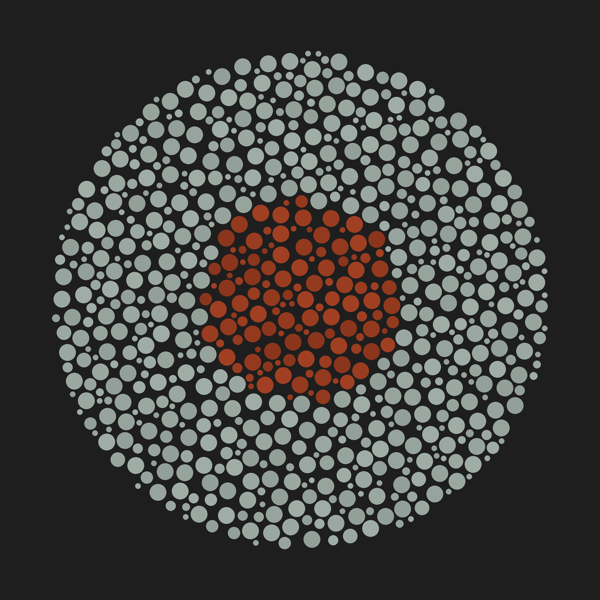
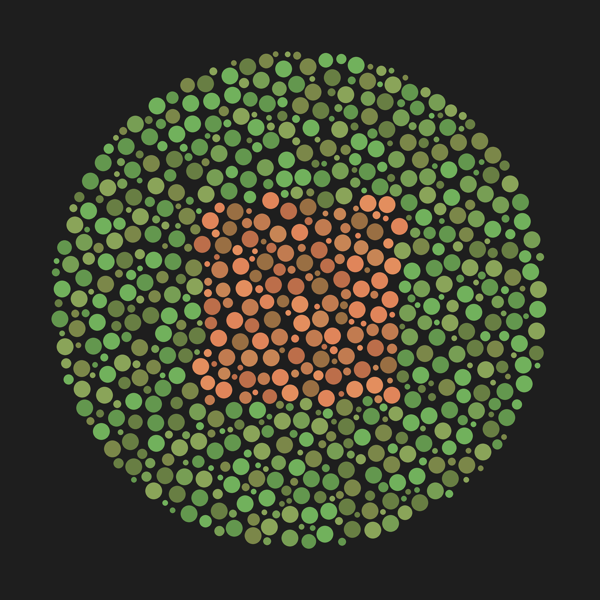
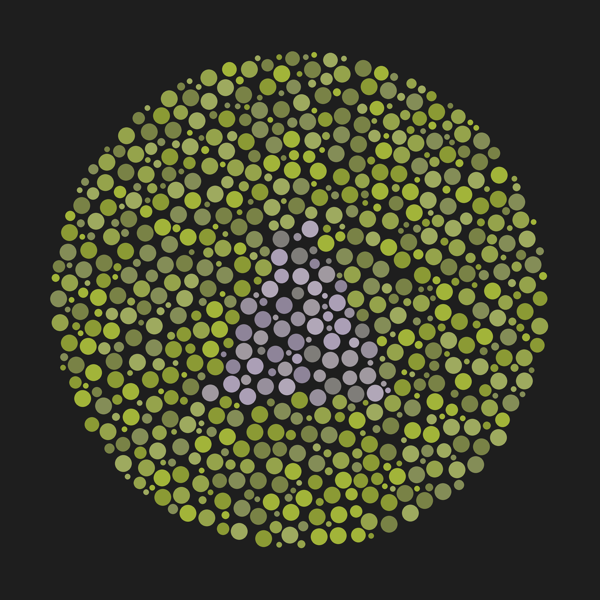
Physical test cards
Print-ready PDF (91.5 × 60 mm cards, 3 mm bleed, crop marks). Generated by the Python code below.
Download PDFPhysical cards and digital screens for testing colour vision, with field-testing results and all the code to make your own.
BuyThe pre-screening log (School Kit V1) used by screeners: three plates, a yes/no for each, and a pass or referral outcome.
| Plate | Purpose | Hidden shape | A "No" means |
|---|---|---|---|
| 1 | Comprehension / control | Circle | Stop and re-explain the instructions |
| 2 | Red-green axis (protan / deutan) | Square | Strong indication of red-green deficiency |
| 3 | Blue-yellow axis (tritan) | Triangle | Strong indication of tritan deficiency (rare) |
Allow 3 to 5 seconds per plate. Pass if all three are identified; otherwise referral is advised.
Print-ready PDF (91.5 × 60 mm cards, 3 mm bleed, crop marks). Generated by the Python code below.
Download PDFNeeds numpy and reportlab.
import random
import numpy as np
from reportlab.pdfgen import canvas
from reportlab.lib.units import mm
from reportlab.lib.colors import HexColor


def hex_list(codes):
    return [HexColor(c) for c in codes]


class ColorblindTestPDF:
    def __init__(self, filename="colorblind_master_print_kit.pdf"):
        # Target trim size: 91.5mm x 60mm
        # Plus 3mm bleed on all 4 sides = 97.5mm x 66.0mm total canvas area
        self.bleed = 3.0 * mm
        self.trim_w = 91.5 * mm
        self.trim_h = 60.0 * mm

        self.page_w = self.trim_w + (2 * self.bleed)
        self.page_h = self.trim_h + (2 * self.bleed)

        # Initialize ReportLab canvas
        self.c = canvas.Canvas(filename, pagesize=(self.page_w, self.page_h))

        # Colour palettes (RGB; the print shop converts to CMYK).
        # Each list holds several shades. The shape and background use the SAME
        # range of lightness, so on the test plates the shape can only be found
        # by hue, not by being lighter or darker.

        # Control: dark shape on light background -> visible to everyone
        self.control_fg = hex_list(["#8B351C", "#93391E", "#9A3C20", "#A13F22"])
        self.control_bg = hex_list(["#939F99", "#97A49D", "#9BA8A1", "#9FADA6"])

        # Red-green: orange shape vs green background, chosen along the
        # red-green confusion line (look the same to protan/deutan vision)
        self.red_green_fg = hex_list(["#996F43", "#BC6E4A", "#C17B50", "#C78555", "#E0855A", "#E38E5E"])
        self.red_green_bg = hex_list(["#687E43", "#7B8749", "#63974E", "#779E54", "#8AA459", "#71B15C"])

        # Blue-yellow: grey-violet shape vs yellow-green background, chosen along
        # the blue-yellow confusion line (look the same to tritan vision)
        self.blue_yellow_fg = hex_list(["#7F7D79", "#8E8499", "#978F9C", "#A099A0", "#AB9FB6", "#B1A7B8"])
        self.blue_yellow_bg = hex_list(["#798246", "#848D57", "#8B9A34", "#95A34B", "#9EAA5F", "#A2B439"])

    def draw_crop_marks(self):
        """Draws professional printer alignment crop marks outside the trim zone."""
        self.c.setStrokeColor(HexColor("#A0A0A0"))
        self.c.setLineWidth(0.3)

        # X/Y bounds of the true trim card size
        x_left = self.bleed
        x_right = self.bleed + self.trim_w
        y_bottom = self.bleed
        y_top = self.bleed + self.trim_h

        # Top-Left Crop Marks
        self.c.line(x_left, y_top + self.bleed, x_left, y_top)
        self.c.line(x_left - self.bleed, y_top, x_left, y_top)

        # Top-Right Crop Marks
        self.c.line(x_right, y_top + self.bleed, x_right, y_top)
        self.c.line(x_right + self.bleed, y_top, x_right, y_top)

        # Bottom-Left Crop Marks
        self.c.line(x_left, y_bottom - self.bleed, x_left, y_bottom)
        self.c.line(x_left - self.bleed, y_bottom, x_left, y_bottom)

        # Bottom-Right Crop Marks
        self.c.line(x_right, y_bottom - self.bleed, x_right, y_bottom)
        self.c.line(x_right + self.bleed, y_bottom, x_right, y_bottom)

    @staticmethod
    def pack_dots(radius, r_max, r_min, gap, attempts=8000):
        """Random dots inside a circle that never overlap (largest dots placed first).
        Returns (x, y, r) relative to the plate centre."""
        cell = 2 * r_max + gap
        grid, dots = {}, []
        for r in np.linspace(r_max, r_min, 6):
            for _ in range(attempts):
                angle = random.uniform(0, 2 * np.pi)
                dist = (radius - r) * np.sqrt(random.uniform(0, 1))
                x, y = dist * np.cos(angle), dist * np.sin(angle)
                gx, gy = int(x // cell), int(y // cell)
                neighbours = (d for i in (gx - 1, gx, gx + 1) for j in (gy - 1, gy, gy + 1)
                                for d in grid.get((i, j), ()))
                if all((x - ox) ** 2 + (y - oy) ** 2 >= (r + orad + gap) ** 2
                        for ox, oy, orad in neighbours):
                    grid.setdefault((gx, gy), []).append((x, y, r))
                    dots.append((x, y, r))
        return dots

    @staticmethod
    def inside_shape(x, y, shape_type, s):
        """True if point (x, y), relative to the plate centre, is inside the shape of size s."""
        if shape_type == "circle":
            return x * x + y * y < s * s
        if shape_type == "square":
            return -s < x < s and -s < y < s
        if shape_type == "triangle":
            (x1, y1), (x2, y2), (x3, y3) = (0, s), (-s, -s), (s, -s)

            def sign(px, py, ax, ay, bx, by):
                return (px - bx) * (ay - by) - (ax - bx) * (py - by)

            b1 = sign(x, y, x1, y1, x2, y2) < 0.0
            b2 = sign(x, y, x2, y2, x3, y3) < 0.0
            b3 = sign(x, y, x3, y3, x1, y1) < 0.0
            return b1 == b2 == b3
        raise ValueError(f"Unknown shape: {shape_type}")

    def generate_matrix_plate(self, fg_colors, bg_colors, shape_type):
        """Draws a dot plate; dots inside the shape use fg_colors, the rest bg_colors."""
        center_x = self.page_w / 2.0
        center_y = self.page_h / 2.0

        matrix_radius = 26 * mm
        shape_radius = 12 * mm

        for x, y, dot_r in self.pack_dots(matrix_radius, r_max=1.5 * mm, r_min=0.5 * mm, gap=0.25 * mm):
            is_inside = self.inside_shape(x, y, shape_type, shape_radius)
            self.c.setFillColor(random.choice(fg_colors if is_inside else bg_colors))
            # Paint native PDF vectors directly to prevent resolution loss
            self.c.circle(center_x + x, center_y + y, dot_r, fill=1, stroke=0)

    def build_kit(self):
        # Page 1: Training Control Plate (Circle)
        self.generate_matrix_plate(self.control_fg, self.control_bg, "circle")
        self.draw_crop_marks()
        self.c.showPage()

        # Page 2: Red-Green Screen (Square)
        self.generate_matrix_plate(self.red_green_fg, self.red_green_bg, "square")
        self.draw_crop_marks()
        self.c.showPage()

        # Page 3: Blue-Yellow Screen (Triangle)
        self.generate_matrix_plate(self.blue_yellow_fg, self.blue_yellow_bg, "triangle")
        self.draw_crop_marks()
        self.c.showPage()

        # Save output compilation
        self.c.save()
        print("Success: Compiled production-ready multi-page master PDF with fixed shapes and bleed.")


if __name__ == "__main__":
    generator = ColorblindTestPDF()
    generator.build_kit()
Needs pillow and numpy.
# Install first by typing this in your terminal (not inside the Python file):
# pip install pillow numpy
import random
import numpy as np
from PIL import Image, ImageDraw

SUPERSAMPLE = 3 # draw 3x bigger, then shrink, so dot edges are smooth on screen


def pack_dots(center, radius, r_max, r_min, gap, attempts=8000):
    """Random dots inside a circle that never overlap (largest dots placed first)."""
    cell = 2 * r_max + gap
    grid, dots = {}, []
    for r in np.linspace(r_max, r_min, 6):
        for _ in range(attempts):
            angle = random.uniform(0, 2 * np.pi)
            dist = (radius - r) * np.sqrt(random.uniform(0, 1))
            x, y = center + dist * np.cos(angle), center + dist * np.sin(angle)
            gx, gy = int(x // cell), int(y // cell)
            neighbours = (d for i in (gx - 1, gx, gx + 1) for j in (gy - 1, gy, gy + 1)
                            for d in grid.get((i, j), ()))
            if all((x - ox) ** 2 + (y - oy) ** 2 >= (r + orad + gap) ** 2
                    for ox, oy, orad in neighbours):
                grid.setdefault((gx, gy), []).append((x, y, r))
                dots.append((x, y, r))
    return dots


def generate_screen_plate(filename, fg_colors, bg_colors, shape_type="circle"):
    """
    Generates a 1080x1080 pixel image optimized for digital LCD/OLED screens.

    fg_colors: list of sRGB tuples for the hidden shape
    bg_colors: list of sRGB tuples for the background dots
    shape_type: "circle", "square", or "triangle"
    """
    canvas_size = 1080
    s = SUPERSAMPLE
    big = canvas_size * s
    # Use a neutral dark gray background instead of black to minimize screen glare
    image = Image.new("RGB", (big, big), (30, 30, 30))
    draw = ImageDraw.Draw(image)


    matrix_center = big // 2
    matrix_radius = 450 * s
    shape_radius = 180 * s

    # 1. First Pass: mask of the target shape (white = inside the shape)
    mask_img = Image.new("L", (big, big), 0)
    mask_draw = ImageDraw.Draw(mask_img)

    if shape_type == "circle":
        mask_draw.ellipse([matrix_center - shape_radius, matrix_center - shape_radius,
                            matrix_center + shape_radius, matrix_center + shape_radius], fill=255)
    elif shape_type == "square":
        mask_draw.rectangle([matrix_center - shape_radius, matrix_center - shape_radius,
                                matrix_center + shape_radius, matrix_center + shape_radius], fill=255)
    elif shape_type == "triangle":
        x1, y1 = matrix_center, matrix_center - shape_radius
        x2, y2 = matrix_center - shape_radius, matrix_center + shape_radius
        x3, y3 = matrix_center + shape_radius, matrix_center + shape_radius
        mask_draw.polygon([x1, y1, x2, y2, x3, y3], fill=255)
    mask_data = np.array(mask_img)

    # 2. Second Pass: non-overlapping dots; each dot takes the colour of its group
    for x, y, dot_r in pack_dots(matrix_center, matrix_radius, r_max=15 * s, r_min=5 * s, gap=3 * s):
        inside = mask_data[int(y), int(x)] > 127
        color = random.choice(fg_colors if inside else bg_colors)
        draw.ellipse([x - dot_r, y - dot_r, x + dot_r, y + dot_r], fill=color)

    image = image.resize((canvas_size, canvas_size), Image.LANCZOS)
    image.save(filename, "PNG")
    print(f"Generated digital screen asset: {filename}")


# sRGB colour sets. The shape and background in each test use the SAME range of
# brightness, so the shape can only be found by hue, not by being lighter/darker.

# Control: dark red shape on light grey -> visible to everyone
srgb_control_fg = [(139, 53, 28), (147, 57, 30), (154, 60, 32), (161, 63, 34)]
srgb_control_bg = [(147, 159, 153), (151, 164, 157), (155, 168, 161), (159, 173, 166)]

# Red-green: orange vs green, on the red-green confusion line
srgb_red_green_fg = [(153, 111, 67), (188, 110, 74), (193, 123, 80),
                    (199, 133, 85), (224, 133, 90), (227, 142, 94)]
srgb_red_green_bg = [(104, 126, 67), (123, 135, 73), (99, 151, 78),
                    (119, 158, 84), (138, 164, 89), (113, 177, 92)]
# Blue-yellow: grey-violet vs yellow-green, on the blue-yellow confusion line
srgb_blue_yellow_fg = [(127, 125, 121), (142, 132, 153), (151, 143, 156),
                    (160, 153, 160), (171, 159, 182), (177, 167, 184)]
srgb_blue_yellow_bg = [(121, 130, 70), (132, 141, 87), (139, 154, 52),
                    (149, 163, 75), (158, 170, 95), (162, 180, 57)]

if __name__ == "__main__":
    generate_screen_plate("screen_plate1_control.png", srgb_control_fg, srgb_control_bg, "circle")
    generate_screen_plate("screen_plate2_redgreen.png", srgb_red_green_fg,
srgb_red_green_bg, "square")
    generate_screen_plate("screen_plate3_blueyellow.png", srgb_blue_yellow_fg,
srgb_blue_yellow_bg, "triangle")